Connect your tools
Connections let Winston work with authorized data from other systems. Start in Settings → Connections and ask a workspace admin for help if the connection controls are unavailable.
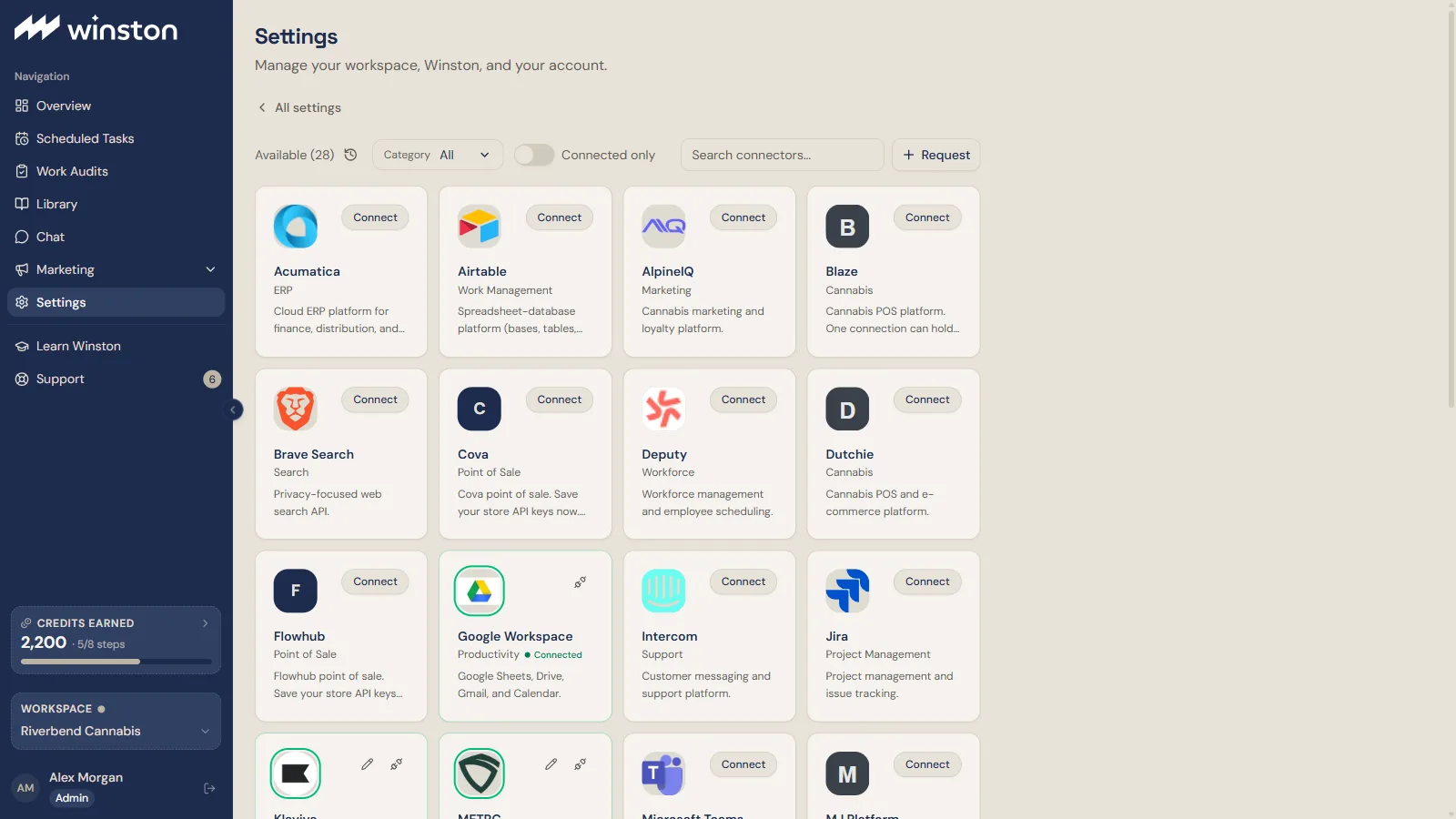
The catalog lists every connector Winston knows, with a category filter, a Connected only switch and a search box. Request at the top is for a system that is not listed. Some POS cards (Cova and Flowhub, for example) accept your store API keys now and say that Winston reads from them once that integration is live; a saved key on one of those is not yet a working connection.
Multi-store POS connectors (Blaze, Dutchie, Sweed, MJ Platform and METRC) hold several stores under one connection, each store on its own row. For MJ Platform, one key covers the whole organization and each store is a facility id; a wrong facility id returns no sales rather than an error, so check the first read carefully.
Overview's checks read from Winston's data warehouse (listed as Snowflake or Winston Data Warehouse), which is provisioned when a POS is connected rather than set up by hand. A workspace without it sees a blurred Overview preview. Settings → Data Warehouse shows the connected sources and warehouse activity.
Connecting Microsoft Teams involves your Microsoft 365 administrator as well as you. That path has its own walkthrough: Use Winston in Microsoft Teams. QuickBooks Online signs you in at Intuit and asks which company to share: Connect QuickBooks Online. Slack connects with one click in Winston and one approval in Slack; see Use Winston in Slack.
Before connecting
Decide which stores or accounts the workflow needs and whether it requires reading data or changing records. Use only the access needed for that work.
Follow the connection card's setup flow. Some systems use a sign-in window; others require credentials from the source system. Enter API keys only in the connection flow, not in Chat or a support message.
Read and write access
A read-only connection supports reading data without writes to that source. A write-enabled connection may support creating or changing records, but the source permission alone does not define everything Winston can do.
Verify a useful connection
After the connection shows Connected, verify the stores and accounts, available history, latest data dates and fields needed for your first task. Start with a small read-only check. A connection can be authorized while still lacking data needed for a particular analysis.
Common requirements include:
- POS records for sales, products, stock and cost analysis.
- Authorized regulatory records for the relevant licenses and compliance comparisons.
- Campaign, attribution and cost data for marketing analysis.
- A supported channel and destination permissions for Slack, email or other delivery.
Availability varies. Use the current connection catalog to check supported tools. A connector or a one-off analysis does not automatically create an Overview monitor. See Data coverage.
A starter prompt in Learn Winston is an example of supported work, not proof that it will run here: it needs the connection, permissions and data it describes. See Examples, not confirmed templates.
Reconnect or disconnect
If access stops working, have an admin check the source account, permissions and connection status. Overview says so in its own words when the warehouse refuses a login ("Couldn't sign in to Snowflake") and offers Contact support with the description filled in. After reconnecting, repeat a bounded read check before relying on scheduled work.
Disconnect stops use of that connection through the disconnect mechanism; confirm any related in-flight jobs and revoke source credentials when needed. Disconnecting is not the same as deleting previously generated files or retained data. Contact Support for the applicable removal process.