Automation
A scheduled task repeats supported work at an agreed time. An Overview monitor checks for a condition; a skill saves a reusable method. These are separate capabilities.
Start with a checked result
Run the task manually and review its scope, data, output and credit use. Resolve missing inputs before making it recurring.
Then ask Winston to schedule the supported task. State the cadence, timezone, store scope and delivery destination. For example:
Verify the saved task
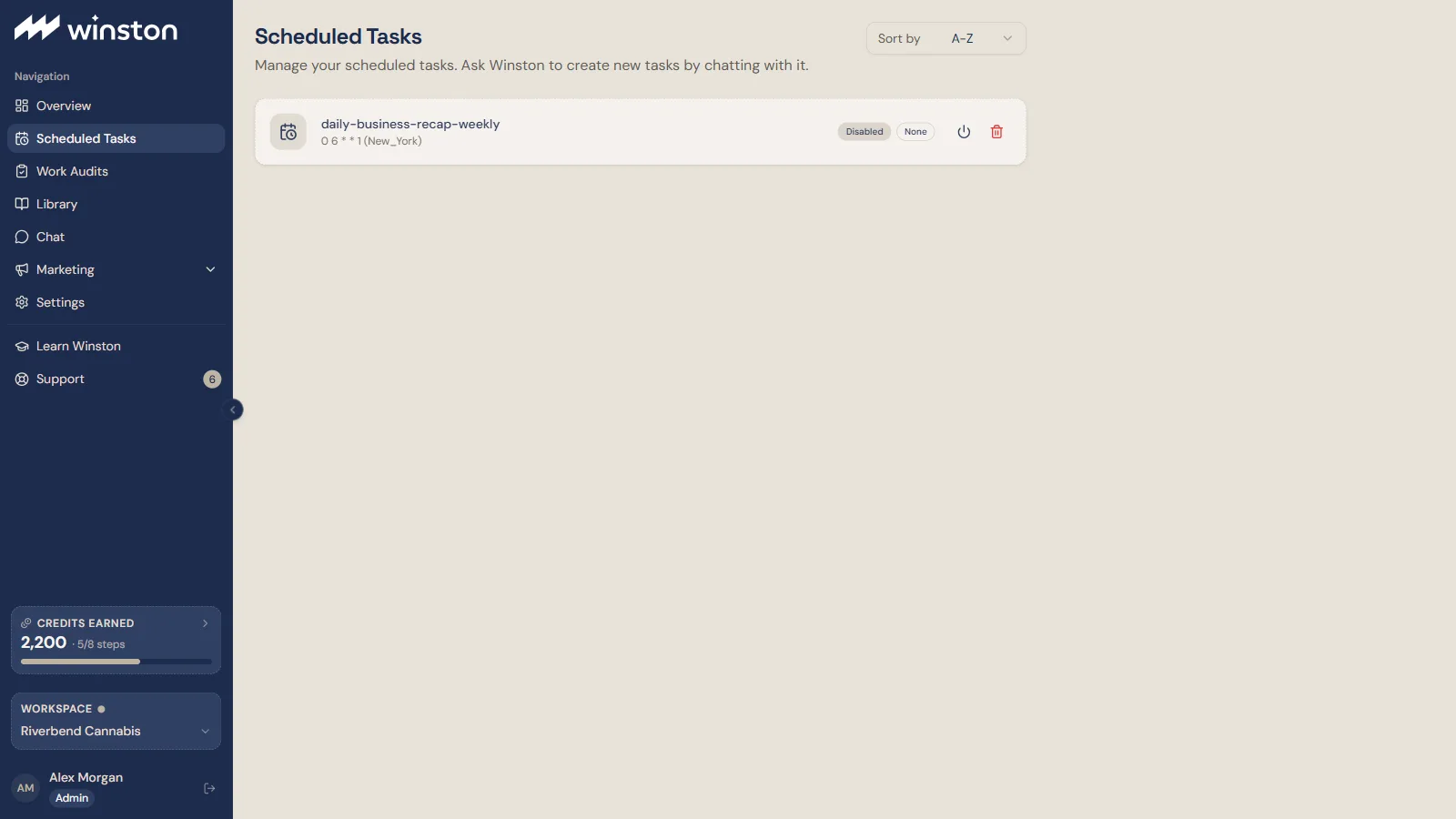
Open Scheduled Tasks and check the job, enabled state, cadence and delivery configuration. The card shows the schedule as a cron expression and timezone, for example 0 6 * * 1 (New_York), an Enabled or Disabled pill, a delivery pill (None, or the destination), and pause and delete controls. Compare them with the confirmation. If they disagree, resolve the mismatch before relying on the schedule. If the card shows a Next value, check it against the intended schedule and timezone. If it is missing or does not read as a date and time, ask Winston to confirm the saved next run. A saved task is not proof of a successful run or delivery.
Specify whether a local wall-clock time should stay fixed across daylight-saving changes. For multi-timezone stores, distinguish the task's run timezone from the store-local analysis periods.
Delivery and credits
A delivery setting of None means no configured external delivery; confirm where the task saves its result rather than assuming every job produces a Library item.
Each run can use credits. Check Usage after representative runs and review active schedules when your balance or priorities change. Check Billing for current terms. See Account and access.
Change, pause or troubleshoot
Use the saved task's controls or ask Winston for a specific change, then verify the resulting configuration. Pausing future runs is separate from stopping an attempt already in progress.
If nothing arrives, check execution and delivery independently. To have a failed run reach you, switch on Scheduled task failures under Your checks on Overview. See Scheduled-task troubleshooting.
Work where your team talks
Where a supported chat connector is available, Winston can receive requests or deliver results through that channel. Confirm the connected workspace, authorized destination and audience. Check the current Connections catalog or ask Support about Slack, Teams or other availability; channel support and rollout can change. For the setup path end to end, see Use Winston in Slack or Use Winston in Microsoft Teams.
For a check that watches a condition rather than running on a clock, see Request a custom monitor.