Account and access
Your workspace brings together your team, connections, outputs and usage. Confirm the workspace before changing access or billing.
Credits and billing
Credits pay for Winston's work. Usage varies with the task, data volume, sources and amount of processing. Check Settings → Billing and Usage for the current balance, plan and recorded usage. Billing has five tabs: Overview, Plans, Usage, Payment method and Invoices.
Plans are monthly and billed from a bank account you link under Payment method; a plan cannot be chosen until one is linked. Plan credits reset each month, purchased credits roll over, and Auto-recharge (a top-up when the balance falls below a threshold you set) needs an active plan. Credits are subject to expiry, and the terms differ by credit type. The Plans tab states the current prices and allowances; this guide does not.
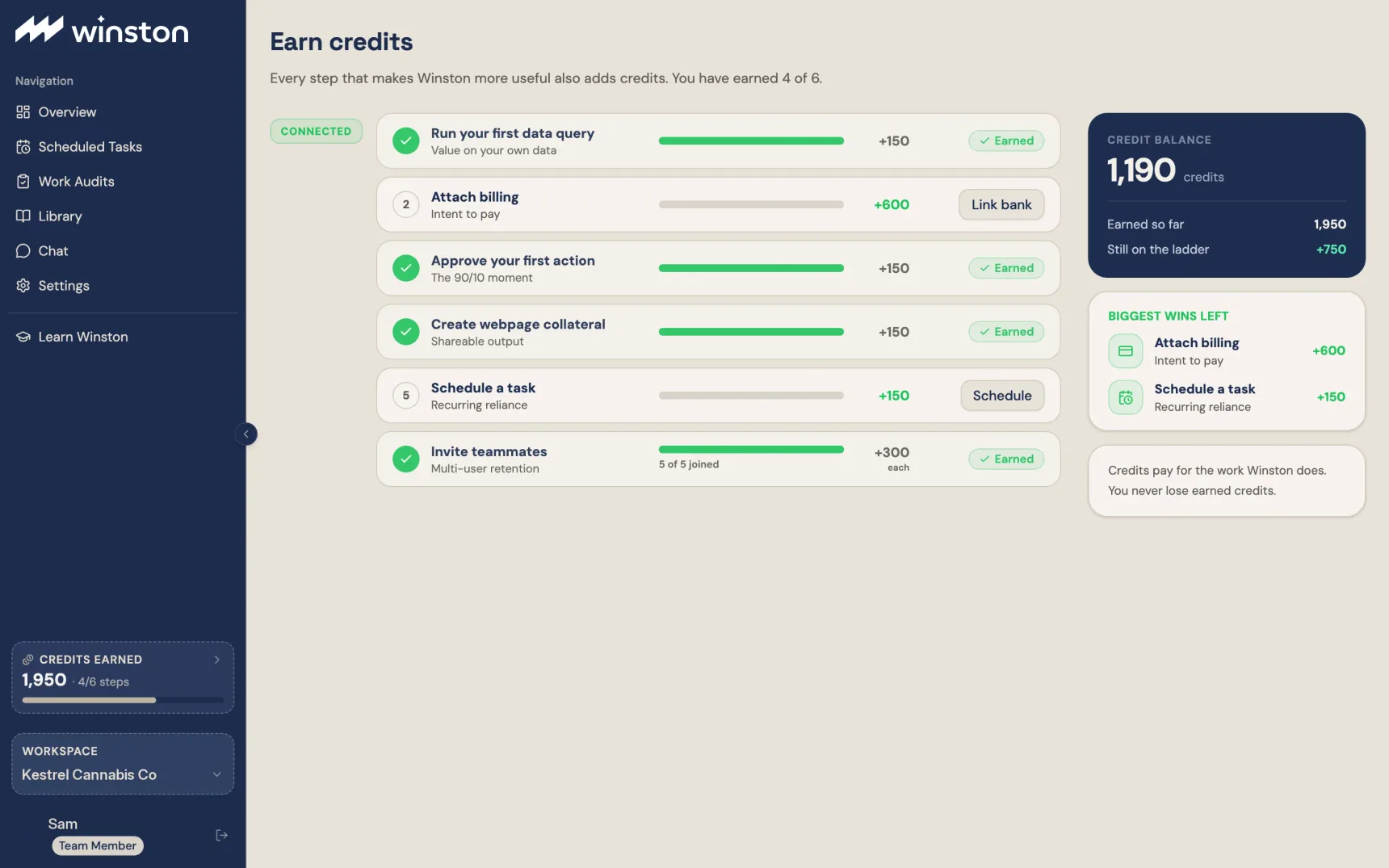
The Earn credits page, opened from the Credits earned bar in the left menu, lists the setup and referral steps with the credits each one adds, which you have completed, and the biggest ones left. Some count more than once, such as inviting teammates and referring an operator, which gives you a link to share. Earned credits are kept. An earned-credit total is not necessarily your remaining spendable balance.
When the free trial ends
A workspace whose trial ends without a plan keeps its data, rules and skills. Overview, Chat, Library, Scheduled Tasks, Work Audits and Marketing show their real counts over blurred content until a plan is chosen; Learn Winston, Settings and billing, and Support stay open. Nothing you see blurred is lost. Talk to us files a support ticket with the workspace details already attached, and opens it so you can add to it.
When a task cannot run because of credits, resolve the balance with the billing owner and check the task's state before trying again. Adding credits does not by itself prove a missed scheduled job was replayed. See Scheduled-task troubleshooting.
Team access
Winston uses three workspace roles. Owner can do everything an admin can, plus billing; there is exactly one per workspace. Admin manages members, agents and settings and can edit the External Rules sheet. Member (shown as Team Member on the Members page) runs prompts and works on tasks but cannot manage members or settings. Settings → Members lists everyone with their role, with Invite User and per-person edit and remove controls; the (i) beside the role picker carries the same descriptions. Ask an admin to confirm who approves work in your workspace. People sign in with an emailed link, with Google, or with Treez when they are Treez users.
Changing anyone's role asks the person making the change for a six-digit code that Winston emails them first (Confirm role change). The code is single use and expires; Send a new code is the answer to an expired one. The owner cannot be removed from Members. A workspace created through Treez may list Treez account staff as admins, invited automatically at signup.
Transfer ownership
Only the current owner can hand the workspace over, and only the owner sees Owner in the role pickers. There are two routes, both confirmed with an emailed code:
- Promote a member. Members → edit the person → choose Owner. The dialog reads Confirm ownership transfer, you enter the code, and the button is Transfer ownership. They become Owner at once and you become an Admin.
- Invite a new owner. Invite User → role Owner. The dialog says the workspace transfers when they accept and that you will become an Admin; Continue sends the code, then Confirm & send invite. Their email says you want to transfer ownership to them, and the accept page says accepting makes them the owner. Nothing changes until they accept. If you are no longer the owner by then, the invitation is refused and revoked.
A workspace is never left without an owner, and two people cannot both end up as owner. If the owner has left and cannot sign in, contact Support, who can complete the transfer for you.
When someone leaves, remove them under Members (an owner or admin can; the owner themselves cannot be removed, so transfer ownership first if it is the owner leaving), and review schedules, delivery destinations and connections associated with them. A teammate's departure does not automatically settle ownership of recurring work or remove copies of previously shared outputs.
Connected-system access
What Winston can do depends on the source's granted permissions, the connector operations Winston supports and workspace controls. Work Audits applies to actions routed through that workflow; do not assume every action takes that route. See Review and approve and Data coverage.
Data and sharing
Use the Privacy Policy and Terms of Service for the current data-use and retention commitments. They distinguish third-party foundational-model training from Winston's use of de-identified or aggregated data for its own model improvement.
The Terms prohibit submitting protected health information and state that the service is not HIPAA-compliant. Ask your organization's data owner when you are unsure what may be uploaded.
For access removal, export, retention or deletion questions, contact Support. Disconnecting a source, deleting a conversation and requesting deletion of retained data are different actions. Verify the sharing controls for each output before sending its link.